In this post I detail one of the recent developments at the School of Engineering at the University of Portsmouth, U.K., the all new Motion based audience response system (MARS), developed by one of my students Emeline.
Response systems are now widely used within classrooms and conferences. The carrier technology used to get the votes from the students to a centralised system is key in such systems. The faster the votes are collected the better the feel of the system. RF keypads perform well in this regards and votes are collected almost instantaneously (2-3 secs delay if that). SMS on the other hand can have longer delays. Tweets and emails can be within the 5 second window. But the truth is that depending on the class size any delay up to 10 seconds is acceptable as different students take time to respond to a question.
In previous posts I have detailed some of our previous development of personal response system / Electronic voting systems / Audience response system (phew so many different names for the same thing!) based on SMS, Bluetooth, twitter and email. In this post I detail a new way to capture the response to multiple choice questions from a class of students using just a simple HD web cam and a laptop with some software that we developed.
Yes, its that simple!
No need for any clickers, keypads or mobile phones (with varying features) or wifi connection etc. Just a web cam suitable to capture your audience, a laptop (2GHz+, 3GB RAM+) and the shiny new MARS software.
Below is a sample screen-shot of how the system mixes a live view from a class-room with as many virtual keypads (with keys A, B, C and D) as there are students to be used by them to respond to a 4 choice question. Video is here now, see below:

 Two types of virtual keypad - Horizontal and Square.

Reflections after 1st use with students:
Response systems are now widely used within classrooms and conferences. The carrier technology used to get the votes from the students to a centralised system is key in such systems. The faster the votes are collected the better the feel of the system. RF keypads perform well in this regards and votes are collected almost instantaneously (2-3 secs delay if that). SMS on the other hand can have longer delays. Tweets and emails can be within the 5 second window. But the truth is that depending on the class size any delay up to 10 seconds is acceptable as different students take time to respond to a question.
In previous posts I have detailed some of our previous development of personal response system / Electronic voting systems / Audience response system (phew so many different names for the same thing!) based on SMS, Bluetooth, twitter and email. In this post I detail a new way to capture the response to multiple choice questions from a class of students using just a simple HD web cam and a laptop with some software that we developed.
Yes, its that simple!
No need for any clickers, keypads or mobile phones (with varying features) or wifi connection etc. Just a web cam suitable to capture your audience, a laptop (2GHz+, 3GB RAM+) and the shiny new MARS software.
Below is a sample screen-shot of how the system mixes a live view from a class-room with as many virtual keypads (with keys A, B, C and D) as there are students to be used by them to respond to a 4 choice question. Video is here now, see below:

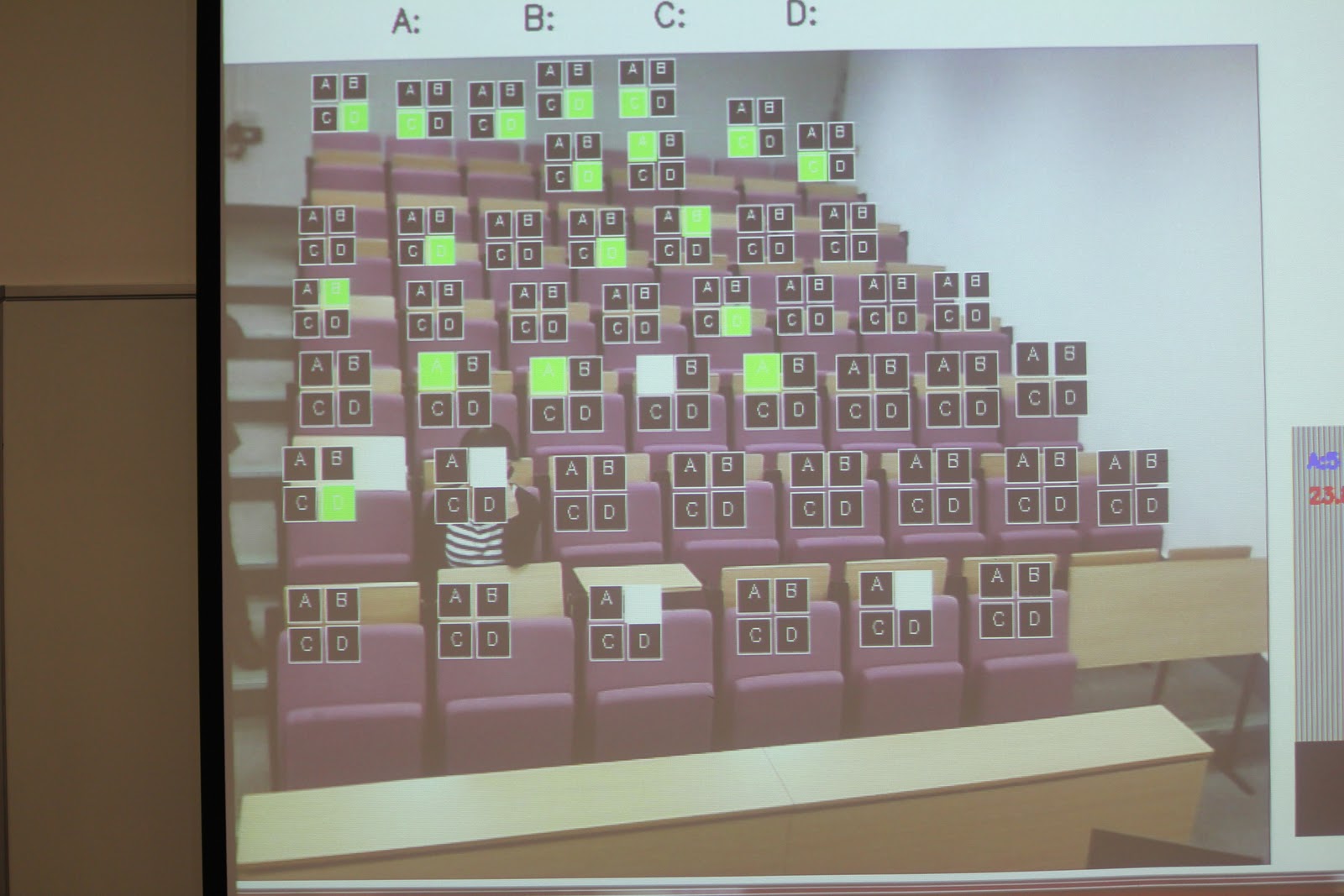
The image you see above is what the student see on the over-head projector, live, as the camera mounted in front of them captures these frames and mixes the black and white virtual keypads wherever it detects human motion. The system can provide these virtual keypads for around 70 students in the audience (limited by the size of the keypad and camera resolution).
Now, imagine the students can also see on the overhead projected screen a question with four choices, one for each letter in the virtual keypad. As students have individual keypads they reach out to the option of their choice with their hand and select the response they want to answer the current question. This is shown in the image below.

This is how the overhead projector screen looks like in full.
 Example class using the system

As you see in the picture above the individual options (A, B, C and D) change colour when students hover their hand over the individual boxes. To vote a student simply hovers their hand three times over the option of choice and the colour changes from orange to red and finally to green (yes, not quite the traffic light!). When the teacher sees enough green lights then they can stop and collect the stats, as shown in the image bottom right.
Reflections after 1st use with students:
I will continue trialing the system in schools (two planned) and in my own classes (as you can see in the pictures above) so more details to follow. Today (19th Sep 2011) I used this system first time with my students and their immediate reaction was "Cool", "Can we have another go at the system" (after I stopped it)" and "it would be nice to get the virtual keypad not to overlap my eyes". The last response can easily addressed when allocating boxes manually as opposed to based on motion. The session lasted 30 minutes and i was able to ask 6 questions and talk about the results and other things within the time. All responses were in within 1 minute.
On the issue of shy students - I think, and I still need to evaluate it properly, the faces of people are covered with the virtual keypads (see pics above) and within 1 min students will probably focus in getting their response in as opposed to check out a) who is sitting where and b) find out what their response is. After the minute we only show the stats and the votes are cleared.
On the issue of shy students - I think, and I still need to evaluate it properly, the faces of people are covered with the virtual keypads (see pics above) and within 1 min students will probably focus in getting their response in as opposed to check out a) who is sitting where and b) find out what their response is. After the minute we only show the stats and the votes are cleared.
Any thoughts, suggestions, applications and inquiries are welcome. Like this post all comments will be treated as creative commons license relevant to this blog (i.e CC BY-NC-ND 2.0).
Happy teaching to you all.

