Sunday, 6 October 2013

Technology Enhanced Active learning & Team Based Learning UK HESTEM community launch

The HEA funded community focussing on use of Technology to foster active learning and team based learning within HE STEM classrooms is officially launched now.

The community is open to all but will focus on STEM subjects being taught at HE institutions within the UK. The tag line really sums it all...

"Engaging students and their devices in classrooms :)"

The aim is really to start an ongoing dialogue between practitioners who wish to move away from information disseminating lectures to a more interactive and student centric future.

We hope you will join and generate discussion about Active Learning and Team based learning with others academics practitioners in the community which will have online presence via a blogroll of community members, twitter feed (@TEALTBL), facebook and G+ community.

These discussions will help form a self sustaining community representing and supporting STEM academics who wish to engage in active and team based learning.  The self sustaining community will continue discussions and collation of examples through an expanding blogroll and community activities like G+ hangouts.

Lectures have been the mainstay for many HE STEM lectures, the newly formed community will provide support to those seeking to move away from this to a more active teaching and learning methodology. Students use laptops and mobile devices in class often for the wrong reasons, we can change that and make classrooms more engaging and active.

We also have planned some very interesting webniars from the likes of Prof. Bob Beichner and Prof Eric Mazur and/or others who are pioneers within this field.

If you wish to join the community or share your work with others please get in touch. For details see
Our Community Site
or
Contact us via email


Saturday, 3 September 2011

Aplha Launch! Cloud Learning Environment, here it is.

Cloud Learning Environment Developed at School of Engineering, University of Portsmouth, UK deployed on the Google Cloud (or Google App Engine).

Cloud Learning Environment (CLE), a term that I coined and got a lot of publicity and attention over the past two years is described in a previous post here. The CLE described below is unique, in that the staff and students using the platform have very similar levels of access rights. Control is kept with the staff only where it absolutely necessary. We have developed this platform at the School of Engineering at the University of Portsmouth in a very short time and there may be bugs and inactive features. This blog will warn you about these in advance.
 
For now it is open to all and can be used using your Gmail / Google credentials and it be accessed at


Cloud Learning Environment (Use chrome or Firefox may work with IE)

Unfortunately there is not much in terms of help files inside the platform however this blog will serve both as an introduction to the environment and its features and as a guide.

To get started click the above link and login using your Gmail ID etc. See the image below for help.
 CLE Login Page (click to enlarge)

Once logged in, you can start by either define some questions in your questions database or creating learning circles (groups or classes).

CLE Landing Page (click to enlarge)

The questions database allows you to define multiple choice questions, short / long answer questions, survey type questions and questions with more than one choice. You can create groupings where you can organize your questions into categories. Details of this part are within the section titled "How to start using the PRS (or the response system app)" see below.

A list of features of this CLE
  • Organize and save questions for  later use
  • Create Exam papers using the above defined questions
  • Create revision sheet for students to revise for exam collaboratively (also called Examopedia)
  • Create a poll to be answered by SMS, email, twitter, hand movement (MARS), Bluetooth and other systems - poll is know as PRS within the CLE (see below on how to use)
  • Create Learning circles or classes to add learners and teachers (see below on how to)
  • access different applications available to the users such as Personal response system (PRS), other automated Google Apps features like create documents, assignments, folders etc and many more
  • Create shared folders/documents within a learning circle
  • Set and Mark assignments within a learning circle 
The text in dark grey are features/apps not yet available but in pipeline.


The list is set to grow over the coming months as we expand the features/functions on the site.

What is a Learning Circle and how to create one?

Learning circle is nothing but the equivalent of a course or class site accessible only to a group of learners and teachers. The unique feature is that both staff and students can use the applications that are available and there is very little power difference for the two type of users. A learning circle can be created by both the students and the staff and the creator then decides who all are given access and with what rights. This opens up the platform to both parties and opens up further uses of the platform. To improve organizing of new and old learning circles over time the landing page has a check-box to show hide the learning circles. 

To create a Learning Circle (LC): Simply follow the instructions within the CLE Landing page above and the screen shots below.  You will need to create a LC if you want to try using the PRS. 

Setting up  / Creating a Learning circle (click to enlarge)
 
When a LC is created and is current it shows up as below on the landing page and can be accessed by clicking the name.


How to start using the PRS (or the response system app)

You will need to define some survey  (or one answer / greater than one answer)  type questions first.

To do so look at the images below and have a go at the instructions within. To get to the screen in the first image below click the button on the landing page that says "My Questions Database".

CLE Questions Database interface (click to enlarge)
 
Questions can be defined within categories which are like say a topic or a unit that you teach. Within each category there can be 4 different types of questions and the ones useful for PRS are listed in the first line of this section above.

To create your first question, create a new category or use the default category on the CLE and select the type of question you want to define.


CLE Questions definition interface  (click to enlarge)
We will create a question in Default category and select the survey type question to start. Choose survey under the "type of the question" choice and type in the question text and the relevant number of options by choosing 2, 3 or 4 under "number of choices" option. You can leave the possible choices set to 1 or can change it if you wish. It allows a user to vote to one or more than one choices. 

Click lock choices when you have made the relevant entries for this questions and click OK. As an example I show you how your question will look like if it was a one answer type question (note that this is not what you are trying here), see below.

Example question (of type - one answer) (click to enlarge)
Once you have defined the question(s) you can move to the next section where we create learning circles so that you can use the questions within your chosen learning circle. PRS app is accessible only within a learning circle whereas the qeuestion database is accessible within and outside the learning circle. After creating a learning circle, click the newly created learning circle and come back here for more instructions.

For example


Click the app that says "PRS", this will launch it.


Launch PRS within a Learning circle  (click to enlarge)

You will see the following screen

CLE PRS App Page (click to enlarge)
The above screen shot shows the questions that I defined earlier using the CLE question definition interface as shown earlier. Select a question, that you want to use, to see the following screen.

 CLE PRS Setup (click to enlarge)
When finished setting up the above screen, you can click broadcast and you will see the following screen. You can choose to generate keywords automatically or define your own. Keywords become clear a bit later. Anonymous users may also use the system alongside users within the learning circle. On clicking broadcast the system sends an email to all registered users in the current learning circle with instructions on how to reply to the question. For non registered users, there is instruction that appears on the screen that follows. If the check box related to anonymous users is not checked then emails from anonymous users are not considered, else they are included in the stats.


CLE PRS Broadcast / Stats page (click to enlarge)

At this stage you could either kill the session and not collect any votes by clicking "abort" button. However this will be pointless for the sake of this demo, hence we will now send some responses to the app so that the stats can be updated dynamically.

Open any email client and send an email with to field defined as "KEYWORD@gcloudlearnappspotmail.com" replacing keyword with the chosen keyword for the option you want to vote. Click send and that's it.


Send your vote via email  (click to enlarge)

You have sent your vote to the PRS App!!! It should appear within a few seconds on the stats page as shown below.

Stats page with data/votes (click to enlarge)

To leave the session running and allow people to continue to answer this question click "continue" to close the popup or click "abort" to end the session and free the keywords. You can always come back to this question by clicking "questions asked tab" on the page below the popup above.

You are hereby invited to use the platform for any purpose you wish.
The features are limited and we reserve the right to stop the service without prior notice. Although this blog may have information in advance of anything like that.
For now we are opening this mainly to collect your views and feedback. Please feel free to either email me on manish.malik@port.ac.uk or use the commenting feature below to post your thoughts, suggestions, comments etc.


Enjoy it.

Friday, 2 September 2011

Motion Based Audience Response system - MARS

In this post I detail one of the recent developments at the School of Engineering at the University of Portsmouth, U.K., the all new Motion based audience response system (MARS), developed by one of my students Emeline.

Response systems are now widely used within classrooms and conferences. The carrier technology used to get the votes from the students to a centralised system is key in such systems. The faster the votes are collected the better the feel of the system. RF keypads perform well in this regards and votes are collected almost instantaneously (2-3 secs delay if that). SMS on the other hand can have longer delays. Tweets and emails can be within the 5 second window. But the truth is that depending on the class size any delay up to 10 seconds is acceptable as different students take time to respond to a question. 

In previous posts I have detailed some of our previous development of personal response system / Electronic voting systems / Audience response system (phew so many different names for the same thing!) based on SMS, Bluetooth, twitter and email. In this post I detail a new way to capture the response to multiple choice questions from a class of students using just a simple HD web cam and a laptop with some software that we developed.

Yes, its that simple!

No need for any clickers, keypads or mobile phones (with varying features) or wifi connection etc. Just a web cam suitable to capture your audience, a laptop (2GHz+, 3GB RAM+) and the shiny new MARS software.

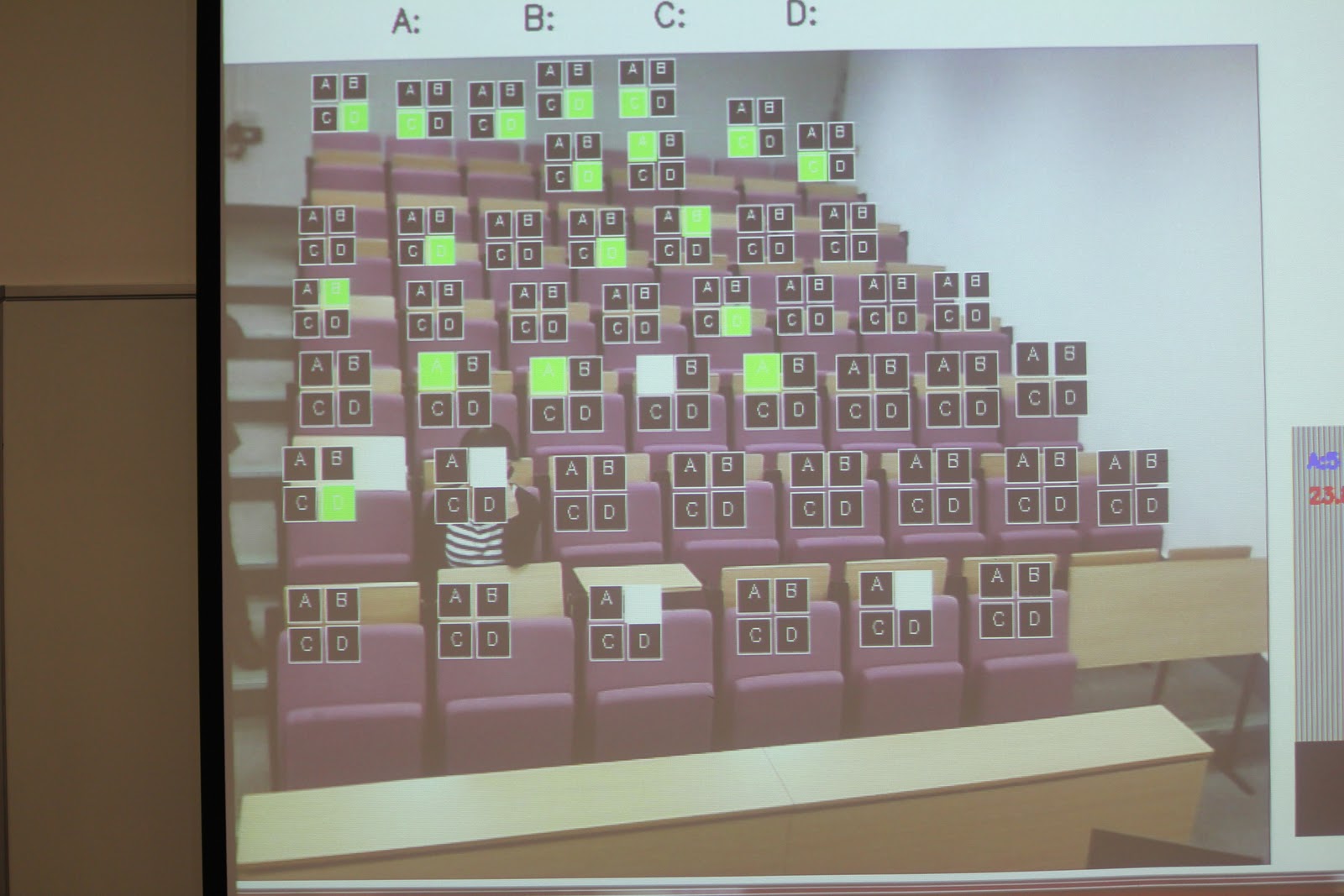
Below is a sample screen-shot of how the system mixes a live view from a class-room with as many virtual keypads (with keys A, B, C and D) as there are students to be used by them to respond to a 4 choice question. Video is here now, see below:


Two types of virtual keypad - Horizontal and Square.
The image you see above is what the student see on the over-head projector, live, as the camera mounted in front of them captures these frames and mixes the black and white virtual keypads wherever it detects human motion. The system can provide these virtual keypads for around 70 students in the audience (limited by the size of the keypad and camera resolution). 

Now, imagine the students can also see on the overhead projected screen a question with four choices, one for each letter in the virtual keypad. As students have individual keypads they reach out to the option of their choice with their hand and select the response they want to answer the current question. This is shown in the image below. 

This is how the overhead projector screen looks like in full.
Example class using the system

As you see in the picture above the individual options (A, B, C and D) change colour when students hover their hand over the individual boxes. To vote a student simply hovers their hand three times over the option of choice and the colour changes from orange to red and finally to green (yes, not quite the traffic light!). When the teacher sees enough green lights then they can stop and collect the stats, as shown in the image bottom right.

Reflections after 1st use with students:
I will continue trialing the system in schools (two planned) and in my own classes (as you can see in the pictures above) so more details to follow. Today (19th Sep 2011) I used this system first time with my students and their immediate reaction was "Cool", "Can we have another go at the system" (after I stopped it)" and "it would be nice to get the virtual keypad not to overlap my eyes". The last response can easily addressed when allocating boxes manually as opposed to based on motion. The session lasted 30 minutes and i was able to ask 6 questions and talk about the results and other things within the time. All responses were in within 1 minute.

On the issue of shy students - I think, and I still need to evaluate it properly, the faces of people are covered with the virtual keypads (see pics above) and within 1 min students will probably focus in getting their response in as opposed to check out a) who is sitting where and b) find out what their response is. After the minute we only show the stats and the votes are cleared.  

Any thoughts, suggestions, applications and inquiries are welcome. Like this post all comments will be treated as creative commons license relevant to this blog (i.e CC BY-NC-ND 2.0).

Happy teaching to you all.


Wednesday, 16 June 2010

iPRISm- Bluetooth Based In class Response System

Interactive Personal Response and Information System - Well this is what I have chosen to call my new invention!

So what does it do? - What it says on the tin! Its a voting cum information push/pull system.

How does it work? - Using mobile phones with bluetooth ON the students can connect with the system in close vicinity of a lecturer's laptop (10 meters at best) to interact in a voting session. The laptop needs Bluetooth or can use a USB BT dongle.

Ok, What can it really do? - We have developed a basic version that will do voting, stats, attendance, registration of devices etc. Things that you would expect in a system of this nature.

How does it manage different versions of Bluetooth implemented by different manufacturers or how does it communicate with different implementations of BT?
 This has been a long standing problem with BT, anything you develop it has to be versioned for several different models/ manufacturers etc. Not this time, I have nailed it and we use the least common infrastructure across all implementations. However, Apple still escapes the reach of my system (but not for long).
What we did was we used the Bluetooth name field to allows users to type in their answer/vote/response to a question they see on the screen. Almost all phones allow you to change the name field of your phone and any bluetooth donggle can be used to read the nearby device friendly names etc. This helps in establishing a channel for communication. Change the friendly name and you have a way to communicate to the bluetooth donggle/PC your vote/response.

What are the limitations of the system?
We find that the system only works upto 7 may be 10 meters. Also students find using the friendly name field objectionable and cumbersome (here is an idea for an App for phones, including iphone). Also it takes longer if there are too many users in the class as the dongle sequentially reads the friendly names of all the phones in the vicinity. There is also the issue of not all students having Bluetooth phones.


Tuesday, 2 February 2010

Cloudy with a chance of Change!

...in the way we provide online learning environments within our institutions.
...in the way we see and form our learning networks.
...in the way we become and continue to be lifelong learners.

In my previous post, Cloud Learning Environment - What it is?, I discussed how a CLE is different from a VLE and a PLE. This caused a lot of debate on twitter and on my post. Here is a summary of the main points as I see it.

Gauging the mood

Confusion in the use of terms: In the UK we call our institutional "walled garden" as the VLEs, where in the US people call it the LMS/CMS, ILE?. Some comments gave the impression that in the US the term PLE/PLN is synonymous with the term VLE in the US? On the whole the term VLE seems to have multiple meanings and causes confusion in what it actually means. While the term PLE is relatively better understood and is a term synonymous to informal learning and lifelong learning.

Poll and comments: Through useful comments from several people, it became clear that a vast majority of our students are still in the process of (to quote one comment) "developing digital citizenship", in other words, are still developing their personal online learning skills, networks and environment. It also became clear that what is in the way of all this is the "walled garden" approach to the "Institutional Learning environment". The poll results show this clearly (12% chose VLEs as what they would rather have for their institutions, most chose CLEs-46% and then PLEs-34%; at N=47). The poll asked about "what would I rather have for my institution?", with VLE/CLE/PLE/Chalk&Talk as 4 options.

What emerges from this is that a majority of the people are accepting of a new term CLE. It represent the openness, individual control and choice within an educational institution/formal learning. Some still argue that this open-ness is what a VLE should provide, no need to call it by another name i.e. CLE. Others in the US see no difference between a VLE and a PLE. No doubt there is confusion in the use of existing terms. Calling for a fresh start.

Even if we put together the votes for PLEs and VLEs, the votes for CLEs are still a greater percentage. This makes sense as with CLE we are talking about a system for use within our institutions AND one that accommodate/integrate PLEs of learners. A CLE is not like a PLE i.e. purely for informal or lifelong learning. It is also not like VLE/LMS/CMS purely for formal education.

What of PLE then?: PLEs are for lifelong learning and informal learning. 34% votes are in its favour. There are two issues here and I hope that at least one of these will resolve with time:

  1. Integration of PLEs with the institutional LMS/CMS (US usage) / VLEs (UK usage). maybe PLEs dont need to be integrated - but I sense that people want to be able to do so. reasons?
  2. Currently students seem to be still developing their online skills, networks and personal learning environments.


Finally I ask myself and othersCould a CLE (or an open VLE) help in the integration of student PLEs with the institutional system? Where a PLE is not already in existence could a CLE encourage students to use other cloud based tools and build their PLEs? (Setting our students up for life-long learning.)
Learning networks formed within a VLE/LMS/CMS may thrive and disintegrate from start to the finish of a course. Importantly, after the completion of a course, such systems do not always allow maintaining the networks for life. Creating barriers to lifelong learning opportunities within learning networks formed during formal educational years. Will a CLE change this by allowing PLEs to mix with and across institutional systems and with other cloud based inter-operable services? Such that when students graduate they can still access their learning network they formed during their course be it inside or outside of their institution.

Posted via email from manishmalik's posterous

Formal and Informal divide

My year started with me making a guest post on Steve Wheeler's award winning blog which can be accessed at "Wisdom of Clouds". By the end of January, there had been a huge number of visits to the post on Steve's and my blog. This spurred a healthy debate which I analyse in another post -Cloudy with a chance of change!. The debate also highlighted this formal and informal divide once again.

 Maybe Graham Atwell misunderstood my stance on PLEs and to clear that I tweeted this on the 24rth of January:

I am not against the concept of #PLEs, in fact they are gr8 for lifelong learning: commented on @GrahamAttwell blog-post http://bit.ly/4quEEW


 my only concern is about when people come to universities do they already have a #PLE, does our VLE/LMS/CMS encourage creation of PLEs? 11:43 PM Jan 24th  


are PLEs easily integrated within formal education? 11:44 PM Jan 24th from TweetDeck   

why do we want to separate formal and informal learning? when we all know learning knows no boundary 11:44 PM Jan 24th  

 As it happens on twitter, this started a discussion between a few of us who were up that late and joined in:

nlafferty: @manmalik they maybe don't have a #PLE when they come at the moment but another year or two or three and I think they will

me: @nlafferty all the more a reason for our VLEs to change and become more "open" as @sputuk would add :)

 nlafferty:@manmalik I agree they should be more open, do you think current VLEs are really learning environments or admin/management environment envt?

 me: @nlafferty I think they R gd as LMS/CMS & thr is potential 4 these 2 provide formal learning but not informal-not obvious atleast #ple #cle

 jamesclay:@manmalik once you integrate informal learning, it becomes formal learning. You can't plan or design informal learning.

 jamesclay:@manmalik once integrated they are no longer PLEs. You can add institutional systems to your PLE, but not the other way.

 me:@jamesclay re planning informal...I think U can collect stats on wht R the most commonly used informal ways students learn & integr8 some

 creativetallis: @jamesclay @manmalik No, but you can help to create conditions in which it thrives

 me:@jamesclay I do like wht U said abt both informal & PLEs...however there R ways 2 include & benefit from some informal approaches

 nlafferty: @manmalik LMS/CMS can deliver learning content & some tools can support formal learning - I'm interested in what students think of VLEs tho'

 nlafferty: @manmalik I'm using VLE as teacher & student - as a student I would say my learning is happening in my PLE. Agree with @jamesclay comments

 me:@nlafferty a PLE is gr8 for life-long learning, I take it you are a one :)

 nlafferty: @manmalik Yep, at least like to think of myself as one, partly why think important for students not just to use VLE but to develop their PLE

 nlafferty: @manmalik Maybe #CLE will speed up, interesting that OU have opted for google apps

 me:@nlafferty exactly my point, students need to develop a #ple they do not always have one, a #CLE introduces will perhaps speed this up :)

 me:@jamesclay re: adding instl syst 2 #ple & not the other way: I think if u have a #CLE U cn add PLE 2 an institutional #CLE too, nt with #VLE

 jamesclay: @creativetallis @manmalik exactly

 jamesclay:@manmalik as soon as you include it it becomes formal. Create environments for informal, but you can't make informal happen.

I am looking for some answers.

  1. Is mixing a PLE with the institutional system a one way process ("You can add institutional systems to your PLE, but not the other way")?  Or is this just a technical limitation of PLEs and existing Institutional systems (LMS/CMS/VLEs)?
  2. Is it true that educational institutions can just facilitate/create environments for informal learning and not make it happen?
  3. Is there a grey area between the formal and informal that needs attention of the academics? Especially with online learning environments and tools.

Some more interesting read on this I found through @C4lpt http://goodpractice.com/blog/planning-to-implement-informal-learning/


Posted via web from manishmalik's posterous

Sunday, 27 December 2009

Examopedia for all students

'myExamopedia' is a wikipedia style, collaborative exam revision site for students anywhere in the world.

The success of Examopedia in my own practice is evident from the Google search for the term "Examopedia". See below, a wonderwheel on the term, links to University of Portsmouth, where I work. It also links to "Exam Revision" related search results, basically showing that it has made its place in the Google Search results. These are the main ones.


I know you are not convinced by its success yet! Now thats perfectly normal. Take look at the report written by Engineering Subject Centre's Associate Phil Barker or read his blog post on Examopedia. For this work I was awarded 1 of 4 National Teaching Awards by the HEA's Engineering subject Centre. This work has also been reported in several JISC projects and report.

Some student voices and usage stats to my site are also avilable for you to see.

Now, if you are convinced and want to use it for your students or if you are a student want to use it with your friends before your exam the visit the free to all Examopedia site.


Figure: Examopedia - Conceptual diagram.

 Exam revision is isolating and stressful, blurred boundaries through the use of web 2.0 technologies (like wiki etc) is shown to have helped. Many student prepare using past exam papers, Examopedia helps form a community around this informal activity students engage with. Its also provided opportunity for academics to gauge student confidence prior to exams on different topics and deliver relevant 'Just-in-time' teaching and encourage deep learning via guidance and feedback given on the site.

To keep you up-to-date with any further developments and future innovations follow @myexamopedia on twitter.

Lastly, if you liked the site or have a suggesstion, please drop a line or two here :).

Thanks for you time.

Saturday, 26 December 2009

Cloud Learning Environment - What it is? (shorter version)

What is a CLE or Cloud Learning Environment? - The cloud can be seen as one big autonomous system not owned by any educational institution/organisation.
Let the Academics or Learners be the users, of some cloud based services, where both share the same privileges like control, choice, sharing of content etc on these services. This control is different from that in a PLE, a VLE or a PTE. If needed, the academic and the learner can have same rights to the shared content. For example, each "Google Site", can be owned by an academic or a Learner and both users be given the same rights/control by one another (depending on who creates first). Likewise Google Docs can be owned and shared between learners themselves or learners and academics under their own control.
This clearly has potential to enable and facilitate both formal and informal learning for the learners in an institution. Both the academic and the learner are free to use the tools the way they wanted and with anyone they wanted. This would not have been possible if the tools used were chosen / managed by either the academics (PTE) or the learners (PLE) or for that matter the institution (VLE). Google Apps was not designed just for institutions or for individuals, it was designed for collaboration both within and across institutions (CLE).
CLEs also make it very easy to generate content and share it with the rest of the world in a DERPable (Discoverable, Editable, Repurposable and Portable) manner, in the spirit of the UKOER programme.

Lastly, students at my institution love the Google Apps interface, which makes it very easy to get them to engage with their work using online tools. This can be seen from the crazy usage statistics of Google Sites where I now host my Examopedia.

Friday, 18 December 2009

Examopedia re-birth on Google Sites - an Exam revision site that lives on the cloud

Examopedia - A collaborative exam revision site that fosters student's informal ways of preparing for exams using past exam papers and helps them improve their solutions to past papers through critical feedback from the academic and peers. This site now lives in the Cloud which makes it an example of a cloud learning environment or CLE.


Exam revision is isolating and stressful, blurred boundaries through the use of web 2.0 technologies (like wiki etc) is shown to have helped. Many student prepare using past exam papers, Examopedia helps form a community around this informal activity students engage with. Its also provided opportunity for academics to gauge student confidence prior to exams on different topics and deliver relevant 'Just-in-time' teaching and encourage deep learning via guidance and feedback given on the site.


The Past
For the past three years I have been using Twiki for my Examopedia service that I run for my students. I have blogged about it earlier. Students particularly did not like the wiki interface and its WYSIWYG editor, although better than most, is not perfect.

This work of mine is quite close to my heart as it has won me the National Teaching Award from the Engineering Subject centre of the HEA as well as University Learning and Teaching Fellowship. Here is a link to a case study by Phil Barker written for the EngSC. Phil has also blogged about the service and has done a wonderful job of explaining the full potential of Examopedia as a service to students and as an OER.

The Present
This blog post is a reflection about moving from an institutional system (using Twiki) to a Cloud Based service - Google Sites. You can visit the new home of Examopedia that is on Google Sites on port.ac.uk domian. (This domain will die eventually and I will have to move it to another port based domain on the cloud).

It is for the first time in three years that I was able to create and share, the wiki pages involved in creating this year's Examopedia, with all students in my class. This meant that all students were invited to view the site via a link in their mail box sent by Google Sites during sharing the site with the students. It is the first time in three years that I could easily give access to all students as collaborators/editors. In the past students were required to create accounts on my Twiki site and only then could they edit the wiki pages. Now the account exists as they all have a google email address.

With Google Apps access to all students and Google mail accounts for all students, this worked like a trick. Better still, I was able to add Google Analytics to capture the site usage and site behaviour. An amazing 3000+ page views in just 14 days of its operation - most of which from portsmouth (class size = 58+80=138 students).

The Future
I have said several times that I wanted to use Google Wave for the Examopedia but decided against that at this stage as Google Wave was accessible by a handful when I created and shared Google Sites with my students.

I think when and if Google Wave becomes part of the Google Apps deal for universities I may try it out as a platform for Examopedia. I think I will straighaway loose out on the analytics part if I did that. Besides I am observing a colleague Dr. Boris Gremont's tutorial wave, who kindly added me to this wave that does what Examopedia does for exam revision but on Google wave.

What do students make of examopedia?
 It will not be wrong if I was to say that it is very successful in what it does and achieve. I surveyed a few students so far and the results are very positive. Its is not for everyone though, especially those who are very independent learners and like to revise all topics individually and practice exam questions individually. But even such student visit the site and read contributions from other students and my feedback/guidance to gain confidence.Forums are not the same as wikis and students can see the difference as in Examopedia students can conly contribute a solution. Communication between collaborators is muted on examopedia, but can go on in the forums if needed. All the contributions to a specific question are at one place as opposed to a forum which usually have a long thread of contributions and arguments too. Reading through these contributions can be confusing and time consuming.

One criticism I had this year was the amount of questions that were on Examopedia. Students said they wanted more questions to revise the entire syllabus. Clearly, they liked the revision service and wanted more of it. Another critiscim was that some of the answers were confusing. I usually provide guidance and feedback on conflicting and confusing answers. This view may have developed prior to me giving feedback but I need to investigate more. There were some access issues initially and for some time as the students first time used Google Sites and the fact that we had 2 domains (@myport and @port) did not help at all. That is why I said above that the @port domain will die eventually and we will have one domain.

Cloud Learning Environment - What it is?

I have been meaning to write this for quite some time now. To be honest, at some point in the run up to the ALT-C 2009 conference, I got this idea. There is a shorter version of this post too. There were many people at a session titled  "the VLE is Dead" hosted by James Clay, Josie Frase, Graham Attwell, Nick Sharrat and Steve Wheeler aka Timbuckteeth :).
Martin Weller blogged about the death of VLE/LMS too in Nov 2007. Scott Leislie coined a term Loosely coupled teaching a month before that. Martin's prediction about a move towards loosely coupled teaching tools has examples in practice today. However, there is more to it. Let me exaplain

PLE...a set of tools that the learners enjoy full control on and choice of.  The tools within a PLE are most likely not used for the purpose of formal education of all learners within an educational institution. Each learner may use a different set of tools to support/enhance their informal learning.

VLE...a set of tools that the learners enjoy very little control over, if any, or choice of and is an institutional system that is mostly likely for formal education. Academics and the institutions have the most control on this learning environment. Learners may have a say in it to some extent.

Loosely coupled.....to quote Scott, "course taught using contemporary social software/web 2.0 tools outside a course management system." - again these tools the learner may have little control over but the academic is the owner and has most control/choice. As its non institutional learning environment, it is most likely to support informal teaching and learning but may be used for formal teaching and learning too. I have blogged on this type of tools as my own personal teaching environment.

CLE or Cloud Learning Environment....The cloud can be seen as one big autonomous system not owned by any educational institution. Let the Academics or Learners be the users, of some cloud based services, who all equally share the privelages like control, choice, sharing of content etc on these services. Then this is different from a PLE, a VLE and a PTE. For example Google Apps for universities is hosted on the cloud, not fully controlled by any educational institution and certainly not owned by one. The tools on it are to a great extent academic or learner controlled. Each "Google Site", for example, can be owned by an academic or a Learner and both users be given the same rights/control by one another (depending on who creates first). Likewise Google Docs can be owned and shared between learners themselves or learners and academics under their own control.

This gives all parties the same rights on same set of tools. This clearly has potential to enable and facilitate both formal and informal learning for the learner. Both the academic and the learner are free to use the tools the way they wanted and share and collaborate with anyone they wanted. This would not have been possible if either the academics or the learners or for that matter the institution designed and developed the set of tools or bought it from any one supplier. Google Apps was not designed just for institutions or for individuals, it was designed for collaboration both within and accross institutions.

CLEs also makes it very easy to generate content and share it with the rest of the world in a DERPable (Discoverable, Editable, Repurposable and Portable) manner, in the spirit of the UKOER programme. With a bit of search engine optimisation it could work magic in terms of making the educational material that sits on a CLE visible and usable by the rest of the world.

Lastly, students at my institution love the Google Apps interface, which makes it very easy to get them to engage with their work using online tools. This can be seen from the crazy usage statistics of Google Sites where I now host my Examopedia.

Wednesday, 15 April 2009

Student mindset, Pedagogy and Technology

I read an interesting post by Ulrich Schrader in response to Timbuckteeth's post on E-learning 3.0. I have responded to the original post by Steve Wheeler recently and on the subject of Mindsets, pedagogy and technology here I go again...

Academic freedom allows academics to choose or subscribe to whatever pedagogy they think works for them and their students. Some of the options to choose from are:

  • the "teacher at centre of Teaching and Learning" approach or
  • the "student at centre" approach or
  • the "network at centre" approach or
  • the "content at centre" approach or
  • a mix of above for some reason or
  • any other approach


What technology? What approach/pedagogy?

  • Static Web sites (Web 1.0) is very suitable for Instructions/Content - "teacher and their generated content at centre" - behaviourist/cognitive.
  • Collaborative technologies (read Web 2.0) are highly suitable for Constructivist and or Socio-Constructivist pedagogy -"student/network at centre".
  • Personalised learning (Semantic Web or Web 3.0?) - "relevant content/ activity at centre" - cognitive
What student mindset?
To elaborate this I present some of the helpful comments from my students:

  • "A simple lecture on this topic would have been enough"
  • "The best part of this unit was the lecture notes/handouts"
  • "Lectures and some discussions with peers helped me broaden my thinking"
  • "I like to be given some really good reading list, like different chapters from different books by different authors on same subject. Quality content that helps me find out the meaning of things myself."
  • "for me the learning environment i.e. being in the company of other students and academics is of importance."

You can actually map these back to different pedagogical theories that I have used.

The above listed comments still do not do justice to the variety of students that is out there. Most academics choose the pedagog(y)ies that they can implement. Or those that cater to the needs of the majority. Inevitably there will be students for whom the chosen approach is not relevant. What about such students? We know well that all pedagogies have their own place and own audience. Therefore, a blend of pedagogies is not a bad thing.

So far...

Higher Education has traditionally been majoritarily behaviourist (Taught Courses-Teacher/their content at centre).

It is, however, changing rapidly anyway. A lot of academics now use the Constructivist approach as their chosen approach (allowing the student to be at the centre). Problem Based Learning (PBL) has gained popularity in many subject areas.

Student managed to learn through lectures. So WHY change?

I do PBL alongside lectures. Why?:

  1. As it allows a change from a "teacher centred approach" to a "student centered approach",
  2. Due to a top down initiative in my department that introduced PBL (I was starting my career then and I joined in),
  3. As technologies like the Web 2.0 Technologies aided me in achieving this easily.
Ok, Lectures plus some constructivist work, WHY change yet again?

Well they say change is the only constant (sorry about the cliche).

I would like to think that the change should not come without some benefits. Someone smart out there with their brilliant new idea should not have an easy sail even if you are generally quick to latch on to new ideas.

If I can reach those students to whom my efforts do not do any good currently then you've got me. If the change is simple then even better. If it embraces (or replaces with a good reason) what I have been doing so far then ultimate. I am beginning to sound like I have a limit to accept change. But that's not true. I am all for it if it meets any of my conditions above. People like to put their stamp on things, in doing that they try to replace old with new. Innovation should build upon the good practice that is ongoing.

If the semantic web can help my students ( example: auto-find the content they need to aid their learning, auto-convert the information to suit individual style) then bring it on. I shall keep the goodies of Web 2.0 and enrich the student experience with whatever comes next in this direction.

To follow or not to follow: that is the question.

Everyone who twitters, either follows or blocks new users at somepoint. This is how they decide which network they want to join and whom to allow to receive their tweets. Twitter networks can be assymetric unlike other Social Networking services such as Facebook or Orkut (which are symmetric).

Other people have talked about their strategies on following/unfollowing new twitter users. Examples include Ms Bell (interesting 3Ps+S model described there). Please post in the comments section if you know of other similar posts that help you make a strategy for follow/unfollow.

Here is my way to decide upon this question:

When someone unfollows you, how do you feel?
I will feel bad. But I have not checked Qwitter for my profile yet. Okay I just did that...and...well I have to wait for them to send me an e-mail (Junk box awaits your email Qwitter).

When someone follows you, what do you do?
I make sure I check if I want them to follow me or not (bots, advertisers etc are particularly not welcome). I follow them back only if their profile is of interst to me and I think the reason for it is simply sustainability (as defined in Ms Bell post above) of my own network. I do not want too many tweets that I do not want to read (cost-benefit).

When you want to follow more people, what you do?
Mostly I find people of interest from within my network as it grows and people use new @names with interesting content in their tweets and I latch on. From time to time I use Twitnet to check the profiles of people on the edges of my network and for that matter people on the edges of other people's networks. This helps me grow my network under my control in a simple visual and more meaningful way.

When do you unfollow someone?
I only ever block people. I have unfollowed a few in the past when I find out that their views are disturbing or not appropriate. Basically my follow strategy saves me the trouble most of that time. In the past I have unfollowed and followed again as I did not have a clear strategy at that time with regard to follow/unfollow. No I have recorded it here so you can think of one for yourself too.

What happens when you have to make a decision to follow or not and you cannot?
In such cases I follow and use tweetdeck to group such people sepearately or keep them in all friends so that I can decide as time goes by. Then I can continue to follow or unfollow them later.

Your thoughts are welcome, please leave a comment below. I use twitter for Project Supervision to create a peer support group/community of interest amongst the studnets I am supervising. I also use it for my professional development. Soon I will introduce twitter in the classroom and the VLE for a true blended experience for me and my students. More on that soon. What do you use it for?

Monday, 13 April 2009

Web 3.0 and its role in Education

This post is in response to Timbuckteeth's (Steve Wheeler's) post on Web 3.0 and e-learning 3.0:


As far as I have experienced it, Web 2.0 is Read/Write/Collaborate (varying shades of it).


From 'create a site', to 'collaborate using a site' to 'search/mash-up the data from n sources to get the best the web has to offer on what you want' is more like what Web 3.0 will have to offer.


Web 3.0 may or may not have more mobile technologies. Mobile technologies do not change the nature of activity that web is used for only it access. So mobile or static access will happen for Web 3.0 - I am not so sure at this stage. I do not care either.


From an institutional prospective: The educational use of Web 3.0 will enable read/write/collaborate and re-present the information to learners in a more meaningful way than what current technologies allow - Filtering/searching/mash up etc will play a big role in all this.


From a learner's point of view: Web 3.0 will further what web 2.0 allowed (i.e. read/write/collaborate) and help learners 'personalise' the information that is created via interactions in Web 2.0 to best suit their own needs.


So far, mainly constructivist principles have found resonance with what e-learning (Web 2.0) has to offer. Web 1.0 was more suitable for Behaviourist principles (online material/ quizzes/feedback etc). Web 3.0 will make the content King, again. Thereby making the cognitive approach to teaching and learning more prominent alongside behaviourists and constructivist approaches.

Learners will use the web to suit their style of learning using their PLE. Institutions will benefit from being able to blend different pedagogies using the web as they need to cater for many different types of learners. Some academics will make use of this more than other giving way to Personal Teaching Environments (PTEs) that make use of the web in this way.

Next big thing will be the content created collaboratively via the web primed for the best use of its users (more personalised). Somewhere the PTE will meet the PLE and Web 3.0 need to make the meeting of these two as smooth as possible.

Thursday, 22 May 2008

Personal Teaching Environment: Exam revision, Google Talk and Social Software

I blogged earlier about the Examopedia site I maintain. Currently this is open to acces by all. Next year I might have to move it behind the intranet. Will it be good or bad I wonder?

I am very happy with the site's use and performance so far. My students used it in the last few days before the exam as can be seen from webstats and Site behaviour. If only they used it throughout the semester ...

Intended us of the site was to tap into collaborative revision amongst the following other things:
  1. provide quick feedback on how to improve exam answers
  2. indicate how many marks an answer would get
  3. encourage sharing and collaboration amongst the students on informal learning activities
  4. reach out to the students who do not normally like taking part
  5. communicate using google talk directly with the students
  6. create a personalised teaching environment that is in my control - (is the VLE/LMS dead really? as Martin Weller said some time ago).
I think we are seeing a change yet again. The VLE era may well be over (for at least it is over). I like the fact that I can use powerful scripts that give me VLE like features to something simple as a wiki. For each course or innovation I can use a set of these scripts to do things I want to.
Forums that we use in my department are much better than those supported in our VLE. To be fair the new WebCTVista seems to have some new features that I would like to use. I wonder in this day and age where you can easily add functionalities to web pages WebCT's model of one size fits all product will stay for long? Besides the boundaries between academic generated content and student generated content are becoming less and less significant.
We are seeing a change where our roles are changing inevitably from teachers to facilitators be it in online distance learning or blended learning environments. In blended learning there will still be the need to be a teacher, however new skills will be needed to facilitate students and their work as more and more students and staff start using the read write web. It looks like I am talking about Web 3.0 (video link).
Comments welcome.

Thursday, 15 May 2008

Google Talk tales

Thanks to Brian Kelly for introducing me to Google talk. Although it was for a completely different purpose which I never got to realise fully.

I have put the google talk code on my wiki/blog/forums and my students seem to find it useful and in just one day I have chated with two students. These students are not on my twitter network but after this session of chat they are wanting to joing me there too.

One slight drawback of this is you will never know who you are chatting to. Also you may find that you are spending a lot of time with them. You may need to define some ground rules with them for this type of support, such as days on which you will address questions from students in this way or some other personall preffered way. I find this satisfying that I can help students in a totally different way. Especially with my flexible working needs I think this is a bonus. I just need my boss to appericiate this. Given that he is a reasonable person I dont think I have to wait for long:).

All in all I think Iam selling my soul to Google.

Monday, 12 May 2008

tweet cloud

it seems mine is about PROJECT STUDENTS, goes to show where my focus is at the moment.

http://www.tweetclouds.com/user_pages/manmalik.html

Social Software for enhancing/supporting students exam revision

I am using a wiki with my students for exam revision. I should really be saying my students are using it for their exam revision. I only come in to provide feedback and an indicative mark so that they get an idea of what to write in the real exam a question similar to the one posted on the wiki.

Exams are fast approaching and many of these students will be using past exam papers for revision for their coming exams. Many a times in the past when I used to do the same for my exam, I would get stuck with a question or two and struggle to find the answer in time before the exam. I found group study was useful in such situation where we physically met and attempted to tap into the collective intelligence of our group. This was then and in the physical world.

Now I am experimenting the same in a virtual environment using a wiki. I am sure it will work The students seem hesitant to begin with but will see the benefit sooner or later. I have already one poster starting to use it and many reads have taken place. Let the snow ball roll.

Here is a link to this project of mine. Guess what i call it....Examopedia.

Sunday, 11 May 2008

Twitter in HE Final year Project Supervision

A bit of background
I got introduced to Twitter through a course run by the OU (H806). Through this course I got to know about many interesting people whom I now follow on twitter (Matrin Weller, Grannie Conole amongst others).

Last year I had piloted e-logs for supervision of project students. The results were promising and students responded positively saying the amount of contact they got from me using the e-log and feedback mechanism was better than what other students were getting. For me, it meant a lot to be better informed about the progress of my students.

One thing was missing then. Twitter - an informal back channel for all students doing project with me. As soon as i heard about it, it automatically filled in that gap and I used twitter with my students for project stupervision.

How to use twitter for Project supervision

There are a lot of things that all my project students do each year this includes the process of planning, organising and doing the project. Up untill now these students would work in isolation, reinventing the wheel all by themselves again. Some students form groups on their own and meet and discuss their studies but not every one gets this opportunity. Being my students they have an added layer of commonality in their projects - GSM/Communication/web/etc - the things that I am interested in.

However, projects tends to be a one person battle. Students may feel lonely and isolated during their project phase.

Here is where I bring in Twitter. I have always belived that friends/communities are formed easily when people are going through similar events that bring with them similar challenges on all involved. Here the target group is project students supervised by myself and I use twitter with them to share with each other their current challenge(s).

We all follow each other. We regualrly post "what we are doing?". We read these short messages and try to help each other. Simple.

For example, A student posted "am stuck with this modem not working" another finds that he has used the same modem and suggests few things to try. I also step in to help. With so many suggestions the problem got solved quickly. Others see this happening and the community feelings grows and they join in too.

For the purpose of supervison I am also using a wiki with these students and they update their project plan progress status on that wiki, apart from this they also put docuements for me to provide feedback.

I have reduced the frequency of the face to face meeting (once in two weeks as opposed to every week) as a result. Blending modes of contact seems to work and my role of being s supervisor cum facilitator is made easier. I am not the only one guding the students they help each other.

I presented this work at the EdMedia Conference in Vienna in 2008.